


A well-designed computer network will help minimize computer and network problems that can negatively impact productivity.
Like a tuned-up engine, all components of your network must work optimally and together. Servers, desktop workstations, cables, switches, routers, etc.,
we have the knowledge and expertise to build your IT network with the right parts.
We make sure your systems are proficient enough to accomplish your tasks, without being more than you need by designing a system that is scalable enough to grow with your business.
File and Print Servers. It’s important that your employees have access to the data they need when they need it.
With our server installation and support services we organize file sharing and printer usage so that your business operations run smoothly.
WAN and VPN. Wide Area Networks and Virtual Private Networks are important for today’s global and remote business environments.
We help ensure your employees can access their work files conveniently and securely. Cabling. Our cabling services help you avoid cable clutter, building code violations and fire hazards.
It’s likely the largest and most complicated portion of a network server installation, but our technicians make sure even the relatively invisible footprint of your cabling is properly installed and diligently organized.
They are trained to neatly install, store and label cables so they can be easily identified should a problem arise.

There are various types of Computer Networking options available. The classification of network in computers can be done according to their size as well as their purpose.
The size of a network should be expressed by the geographic area and number of computers, which are a part of their networks. It includes devices housed in a single room to millions of devices spread across the world. Following are the popular types of Computer Network:

PAN (Personal Area Network) is a computer network formed around a person.
- It is mostly personal devices network equipped within a limited area.
- Allows you to handle the interconnection of IT devices at the surrounding of a single user.
- PAN includes mobile devices, tablet, and laptop.
- It can be wirelessly connected to the internet called WPAN.
- Appliances use for PAN: cordless mice, keyboards, and Bluetooth systems.

- PAN networks are relatively secure and safe
- It offers only short-
range solution up to ten meters - Strictly restricted to a small area

- It may establish a bad connection to other networks at the same radio bands.
- Distance limits.

A Local Area Network (LAN) is a group of computer and peripheral devices which are connected in a limited area such as school, laboratory, home, and office building. It is a widely useful network for sharing resources like files, printers, games, and other application. The simplest type of LAN network is to connect computers and a printer in someone’s home or office. In general, LAN will be used as one type of transmission medium. It is a network which consists of less than 5000 interconnected devices across several buildings.
Important characteristics of a LAN network:
- It is a private network, so an outside regulatory body never controls it.
- LAN operates at a relatively higher speed compared to other WAN systems.
- There are various kinds of media access control methods like token ring and Ethernet.

- Simple and reasonable cost: The primary benefit of the local area network is that is immediate and easy to set up and also its price is minimum.
- Accessing of software program: With the help of LAN, software programs are also shared. You can incorporate a single licensed program that can be used by any device on a network. It is very costly to buy a license for every device on a network, consequently sharing software is a simple and straightforward way.
- Data protection: Data protection is a safe and secure way to keep information on the server. Here if you wish to update or eliminate any data, you can do so rapidly on a single server computer and other devices are obtain to new information.
- Fast communication: LAN-
connected system to communicate directly at very high speed, based on the LAN model and installed Ethernet cabling. The most prevalent enabled speed is 10Mbps, 100Mbps, and 1000Mbps.

- Limited distance: Local area networks are used only in buildings or apartment complexes it cannot be occupied in bigger areas.
- Information security issue created: If the server equipment is not programmed correctly then unapproved users can retrieve data and there is a technical mistake. There arise issues like server privacy.
- Installing LAN is expensive: It is expensive to establish a LAN. Here specialized software is essential to install a server. Communication hardware such as hubs, switches, routers, and cables are expensive to buy.
- Data sharing via outside source: It is difficult and time-
consuming to send files from outside the network since transportable media like pen drives and CDs cannot be easily performed on all devices on the network. - Limited scalability: LANs are limited in terms of the number of devices that can be connected to them. As the number of devices increases, the network can become slow and congested.
- Single point of failure: LANs typically have a single point of failure, such as a central server. If this server fails, the entire network can go down.
- Maintenance and management: LANs require regular maintenance and management to ensure optimal performance. This can be time-
consuming and costly.

WAN (Wide Area Network) is another important computer network that which is spread across a large geographical area. WAN network system could be a connection of a LAN which connects with other LAN’s using telephone lines and radio waves. It is mostly limited to an enterprise or an organization.
Characteristics of WAN:
- The software files will be shared among all the users; therefore, all can access to the latest files.
- Any organization can form its global integrated network using WAN.

- Large area coverage: WAN covers a large geographical area (1000 km or more than). Ex. If your business office is situated in another country and you live in another country then WAN is a platform to communicate with each other (i.e. you and your office staff members).
- Higher bandwidth: WAN networks usually cover large geographical areas. Ex.1000 km or more than the wide area network has higher bandwidth than LAN and MAN networks.
- Centralized data: Using the WAN network you can share the data connected to all the devices in the respective network. Ex. By using the WAN network, all branches are capable to share all data through the head office server and you can get support, full backup, and other precious data from the head office, and all data gets synchronized along with all other company branches.
- Message Exchange: With the help of the Internet Of Things (IoT) and LAN, a sudden growth of WAN-
based devices can be seen. This communication via message can be done fastest with the help of the most popular apps like messenger and WhatsApp.

- Security issue: WAN faces more security problems than LAN and MAN networks due to WAN networks more technologies are merged. It can open a security gap, which paves the way of occurring malicious attacks and identity intruders.
- Installation cost: WANs are default complex and complicated because of large geographical area coverage. Hence there is a set-
up cost in expensive WAN that also needs routers, switches, and other security solutions. - Troubleshooting issues: Troubleshoot the big challenge on the WAN network and it requires more time. If any issue occurs in the computer network, then it is the most difficult part to find out the proper cause due to their broad coverage area.
- Maintenance issues: In a WAN network, it is difficult to maintain the network especially a data center that operates 24/7 is the biggest challenge out of all. Here 24/7 needs assistance from network administrators and technicians. In a WAN, maintenance cost is high.

A Metropolitan Area Network or MAN is consisting of a computer network across an entire city, college campus, or a small region. This type of network is large than a LAN, which is mostly limited to a single building or site. Depending upon the type of configuration, this type of network allows you to cover an area from several miles to tens of miles.

Important characteristics of the MAN network:
- It mostly covers towns and cities in a maximum 50 km range
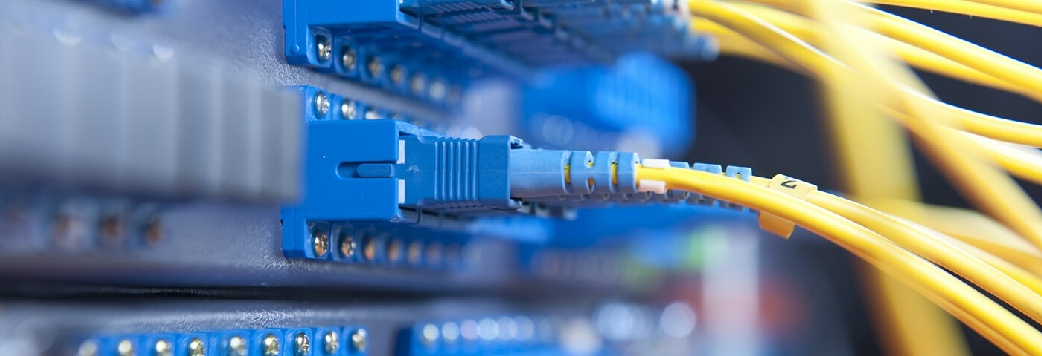
- Mostly used medium is optical fibers, cables
- Data rates adequate for distributed computing applications.

- Security: MAN provides more security as compared to WAN and it is easy to implement.
- Distance occupies: MAN is occupied more distance as compared to LAN i.e. It is wider than LAN.
- Less expensive: MAN implementation cost is less than WAN because MAN requires fewer resources as compared to WAN. It saves implementation costs.
- High speed: Man has a high speed of data transfer because MAN often uses fiber optics cables that are capable of offering speeds up to 1000Mbps.
- Centralized management: MANs can be centrally managed, making it easier to monitor and control network traffic.
- Cost-
effective: Compared to WANs, MANs are more cost- effective to implement and maintain. - Scalability: MANs can be easily scaled up or down to meet changing business needs.
- Improved communication: MANs can improve communication within organizations by allowing for faster and more efficient sharing of data and resources.

- The problem of less security: It is difficult to secure the system from hackers because of the large area. This is mainly due to safety issues.
- Wire required: more cables are required to connect MAN from one place to another. MAN requires fiber optics cables which are quite expensive.
- Technical assistance: Here, skilled technicians and administrators are required. This can overall increase the installation cost.
- Difficult to manage: MAN consumes a large area then there is difficult to manage a large network, Here is a chance of attacking hackers on the network. Data can be secured but it needs experienced staff and security tools.

A virtual private network is a computer network that gives online privacy to a user by creating an encrypted connection from a device to a network. It uses tunneling protocols to encrypt sensitive data from a sender, transmit it, and then decrypt it at the receiver’s end.
Because the user’s Internet protocol (IP) address is masked and untraceable during this process, it provides a high level of privacy. The most common use of VPN technology is keeping all online recreational activities of an individual untraceable, even when accessed on a private Wi-Fi network.
When used for businesses, a VPN only allows authorized personnel to access data of the organization through the Internet. With the help of a VPN, an organization with multiple offices globally can share its data with its employees, irrespective of location. This can be safely done because their IP addresses are masked, even while accessing public Wi-Fi networks. VPN significantly reduces the threat of cyber-attacks and security breaches.
Shifting from wired to wireless LANs is a result of people's growing need for portability and adaptability in their everyday lives. WLANs are widespread in the modern world. Wireless LANs are available everywhere, from homes to businesses to cafes to many public spaces, guaranteeing that we will always have access to the Internet.
WLANs allow us to stay online even while we're in transit. Because of the freedom it gave its users to roam about while still being productive, smart gadgets have become more popular.
A Wireless Local Area Network (WLAN), also known as a Wireless LAN, is a network comprising two or more computing devices that communicate through radio waves without the need for physical connections. This stands in contrast to a local area network (LAN) that employs wired connectivity, whereby every computer within the network is physically linked to the network switch or hub via an Ethernet cable.
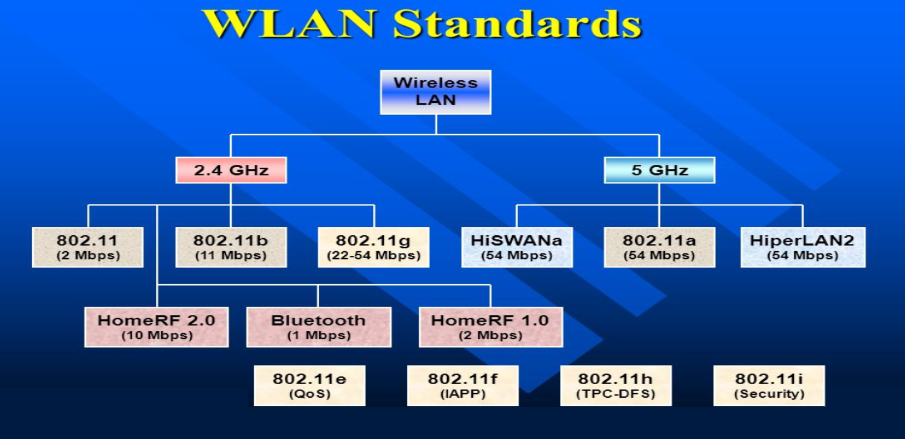
Wireless LANs with infrastructure are equipped with a backbone that operates at high speeds and can be wired or wireless. Access points serve as the intermediary between wireless nodes and the wired backbone. The utilization of access points allows the proficient transfer of network resources among wireless nodes.
Before transmitting information, wireless devices such as clients and access points are required to establish a relationship or association. Data exchange between two wireless stations can only occur once an association has been established.

WLANs are utilized in different circumstances and serve their purpose.
Networking and Internet services are seen as essential in modern business computing. There is a growing trend of LAN users transitioning towards mobile usage. Mobile users necessitate network connectivity irrespective of location as they seek simultaneous access to the network. Wireless LANs allow users to access shared information without the need for physical connections to their systems, thereby eliminating the need for network managers to install cables and other equipment to set up networks.
The significance of mobile connectivity is often overlooked; however, it becomes especially critical when one is faced with urgent needs but lacks access to a WLAN.

Understanding the functioning of WLAN is straightforward. The operational principles of LAN networking are nearly identical. The only difference is that WLAN allows the connection of devices to a network without the need for a physical cable.
- Wireless Local Area Network (WLAN) employs radio frequency waves to help with the transmission and reception of data among various devices, such as a wireless router and a laptop.
- Radio waves are commonly known as radio carriers due to their primary role of transmitting energy to a distant receiver. The radio carrier overlays the transmitted data, thereby allowing its precise retrieval upon reception.
- The process is commonly known as modulation. In a wireless local area network setup, a transceiver device, commonly referred to as an access point, establishes a connection to the wired network via standard cabling from a fixed position. The access point functions as an intermediary device that allows the transfer of data between the WLAN and the wired network infrastructure by receiving, buffering, and re transmitting the data.
- A single access point can handle a limited number of users and can operate within a distance from under one hundred to multiple hundred feet. Typically, the access point, along with its attached antenna, is installed at an elevated position. However, it may be situated in any feasible location that achieves the desired radio coverage.
- Wireless LAN adapters serve as the medium through which end users gain access to the wireless LAN. These adapters are available in the form of add-
on cards for notebook or palmtop computers, as cards for desktop computers, or as integrated components within hand- held computers. WLAN adapters allow a communication interface between the client's network operating system (NOS) and the airwaves through an antenna.

Network infrastructure devices are certainly the components of a network that transport communications needed for data, applications, services, and multi-
They are targeted by malicious cyber actors because most or all organizational and customer traffic must definitely pass through them:
- An attacker with presence on an organization’s gateway router can monitor, modify, and deny traffic to and from the organization.
- An attacker with presence on an organization’s internal routing and switching infrastructure can monitor, modify, and deny traffic to and from key hosts inside the network and leverage trust relationships to conduct lateral movement to other hosts.
Organizations and individuals that use legacy, unencrypted protocols to manage hosts and services make successful credential harvesting easy for malicious cyber actors. Whoever controls the routing infrastructure of a network essentially controls the data flowing through the network.

Network infrastructure devices are often easy targets for attackers. Once installed, many network devices are not maintained at the same security level as general-
- Few network devices especially small office-
home office and residential, class routers run antivirus, integrity- maintenance, and other security tools that help protect general purpose hosts. - Manufacturers build and distribute these network devices with exploitable services, which are enabled for ease of installation, operation, and maintenance.
- Owners and operators of network devices often do not change vendor default settings, harden them for operations, or perform regular patching.
- Internet service providers may not replace equipment on a customer’s property once the equipment is no longer supported by the manufacturer or vendor.
- Owners and operators often overlook network devices when they investigate, look for intruders, and restore general purpose hosts after cyber intrusions

The Cyber security and Infrastructure Security Agency (CISA) encourages users and network administrators to implement the following recommendations to better secure their network infrastructure:
- Segment and segregate networks and functions.
- Limit unnecessary lateral communications.
- Harden network devices.
- Secure access to infrastructure devices.
- Perform out-
of- band (OoB) network management. - Validate integrity of hardware and software.


IEEE 802.11 is the standard protocol for wireless local area networks that make it possible to connect securely to high-




- Computer Network
- Data Recovery Services
- IT Business and Services
- IT Support Services
- On Site Support
- Remote Desktop Assistance
- Cloud Computing
- Information Security
- Networks allow devices to connect to each other and share information. These devices can include computers, printers, servers or other such devices. This allows for an incredible amount of adaptability, mobility, and customizability.
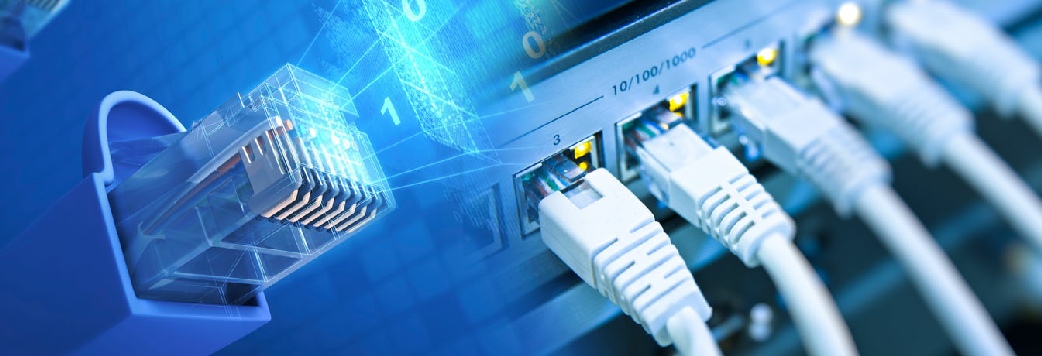
- You can choose between one of two main different categories of networks: wireless and wired. Wireless networks usually involve a router, which acts as the central hub of communication, relaying the data back to each individual computer or device on the network.
- Alternatively, you can use wired networks. These use Ethernet cables or other forms of physical, wired networks.
- There is no one-
size- fits- all approach to networks. Different needs have different solutions. That’s why we will sit down with you to discuss your network services needs and goals.
All Trademarks and Registered Trademarks are the property of their respective Owners.
2005 – 2024 Darwin & Associates IT, All rights Reserved
- Increased Connectivity: Networks enable individuals and businesses to connect and communicate with each other across large distances, facilitating collaboration and the sharing of information.
- Improved Efficiency: Networks enable the sharing of resources, such as printers, scanners, and storage devices, among multiple users, which can improve efficiency and reduce costs.
- Greater Flexibility: Networks allow users to access resources and data from anywhere, at any time, using a variety of devices, including smartphones, tablets, laptops, and desktop computers.
- Portability: With wireless access ports, you will be able to carry WiFi devices all throughout your home or office without worrying about connecting physically. You can even access the network from anywhere in the world, saving time and increasing productivity.
- Time saving: Transferring files from one computer to another through a wireless connection or through other types of networks saves a lot of time (especially when you contrast this process with moving files physically with a USB drive or burning a CD).
- Better Performance: Network support services can help optimize network performance by ensuring that all devices are properly configured, and that network traffic is prioritized appropriately.
- Enhanced Security: Network support services can provide advanced security features such as firewalls, intrusion detection and prevention systems, and antivirus software to protect against cyber threats.
- Increased Reliability: Network support services can monitor and maintain network infrastructure to ensure maximum uptime and minimize downtime, improving reliability and reducing the risk of data loss or corruption.
- Cost Savings: Networks and network support services can help reduce costs by enabling the sharing of resources and facilitating remote work, which can reduce the need for expensive office space and travel.

Whether building a computer network, upgrading or modifying an existing one, we can assist at every step. Prior to network installation an IT systems audit will be carried out to assess your specific requirements.
Darwin IT provides complete network solutions for all small business. By looking at your business as a whole we can advise on hardware-
In addition, we also provide secure wireless network solutions and can arrange an on-
Network Installation, we have extensive experience in all aspects of computer networks from client/servers to peripheral device configuration, data cabling and email provision.
We will provide a business network to suit your exact requirements and have an outstanding track record in network installation and IT support. Darwin IT has established an impressive portfolio of clients with a business model aimed at 100% customer satisfaction.
The main objective of every installation process is to avoid/minimize client downtime. This is of paramount importance to Darwin IT and as such we offer a weekend install service. Although no downtime can ever be guaranteed we will make every effort to ensure that it is minimized and that business critical systems are given the utmost priority.
We only use branded, tried and tested kit and will perform a free onsite inspection prior to recommending a wireless network solution. If a wireless network is not appropriate we will advise on an alternative solution. Our team will ensure that the best possible hardware -
All networks (wired and wireless) installed by us utilize the latest security technology to ensure that your network is fully protected to protect your business and give you peace of mind.
Identifying the applications that you intend to use:
Computer networking may be required diverse environments such as Enterprise Resource Management (ERM), Internet telephony, Instant Messaging (IM), email and others. It is important to discuss the applications that you intend to use such as the above. These in turn are used for estimating the software, hardware, and traffic requirements.
Traffic Requirements:
Computing traffic requirements include several factors. A few points to consider include the following:
- Identification and documentation of major traffic sources.
- Categorization of traffic as local, distributed, client-
server, peer- to- peer, terminal- host or server- server. - Estimation of bandwidth requirements for each application.
- Quality of Service (QoS) requirements for each application
- Reliability requirements.
Scalability Requirements:
Scalability refers to the extent of network growth that should be supported. For corporate network, scalability is a major consideration. Provision must be made to add users, applications, additional sites, and external network connections.
Geographical considerations:
Consider the LAN and WAN links that may be required. Offices that are separated by large distance can be linked together by a WAN (Wide Area Network) link. Similarly, building complexes within a compound can be linked by a LAN (Local Area Network) link. Typically, the LAN links are high bandwidth (10Mbps and above) and WAN links are of lower bandwidth (64 Kbps -
Availability:
The availability of a network needs to be given careful consideration while designing a network. It is the amount of time a network is available to users over a period of time and is often a critical design parameter. Availability has direct relation with the amount of redundancy required. Another important factor that needs to be considered when computing availability requirements is the business loss to the Company due to unavailability of the network for a given amount of time. A right balance needs to be arrived at such that the profitability is maintained.
Security and Accessibility:
Security and accessibility are among the important design phase steps. A security plan needs to be devised that meets the required security specifications.
You must specify:
- a list of network services that will be provided such as FTP, Web, e-
mail, etc. - Who will be administering the security of these services?
- How the people be trained on security policies and procedures
- Recovery plan, in case a security breach does take place.
Cost considerations:
For LANs, the tendency is to minimize the equipment cost (cable cost, minimizing the per port cost, and the labor cost).
For WAN's the primary goal is to minimize the usage of the bandwidth. This is because, the recurring costs for bandwidth are normally much higher than the equipment or labor cost. Therefore, more weightage is given to reliable equipment, and efficient utilization of bandwidth.


You should rely on your VPN to perform one or more tasks. The VPN itself should also be protected against compromise. These are the features you should expect from a comprehensive VPN solution:
- Encryption of your IP address: The primary job of a VPN is to hide your IP address from your ISP and other third parties. This allows you to send and receive information online without the risk of anyone but you and the VPN provider seeing it.
- Encryption of protocols: A VPN should also prevent you from leaving traces, for example, in the form of your Internet history, search history and cookies. The encryption of cookies is especially important because it prevents third parties from gaining access to confidential information such as personal data, financial information and other content on websites.
- Kill switch: If your VPN connection is suddenly interrupted, your secure connection will also be interrupted. A good VPN can detect this sudden downtime and terminate preselected programs, reducing the likelihood that data is compromised.
- Two-
factor authentication: By using a variety of authentication methods, a strong VPN checks everyone who tries to log in. For example, you might be prompted to enter a password, after which a code is sent to your mobile device. This makes it difficult for uninvited third parties to access your secure connection.
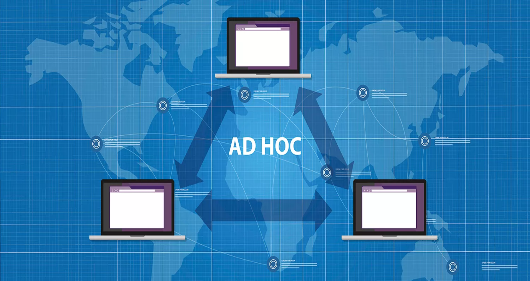
Wireless LANs are further classified into two categories such as:

Ad hoc networks are formed by a group of wireless nodes that establish peer-
If a client wants to communicate outside the cell, then it’s a must that one of the cells acts as the gateway and performs routing.


- Mobility: WLANs allow users to access network resources and services from anywhere within the coverage area without being restricted by cables or wires. This increases productivity and flexibility for users working from different locations or moving around while staying connected.
- Scalability: WLANs can easily accommodate changes in the network's number of devices or users by adding or removing access points as needed. WLANs can also support different types of devices and applications, such as voice, video, and data.
- Cost: WLANs can reduce the cost of network installation and maintenance costs by eliminating the need for wiring and cabling. WLANs can also save energy and space by using less power and equipment than wired networks.
- Security: Using encryption, authentication, and firewall technologies, WLANs can provide secure network access to authorized users. Using frequency hopping and spread spectrum techniques, WLANs can also protect the network from interference and eavesdropping.
- Limited range: WLAN signals have a limited coverage area compared to wired networks.
- Interference and congestion: Wireless networks can experience interference and congestion from other devices and neighboring networks.
- Security concerns: WLANs are more susceptible to unauthorized access and data breaches without proper security measures.
- Signal degradation: WLAN signals can be affected by distance, physical obstructions, and electromagnetic interference, leading to reduced performance.
- Reliability and performance issues: WLANs may experience dropped connections, latency, and slower data transfer speeds.
- Cost and complexity: Setting up and maintaining a WLAN can be more expensive and complex compared to wired networks.
Your Internet service provider (ISP)usually sets up your connection when you connect to the Internet. It tracks you via an IP address. Your network traffic is routed through your ISP's servers, which can log and display everything you do online.
Your ISP may seem trustworthy, but it may share your browsing history with advertisers, the police or government, and/or other third parties. ISPs can also fall victim to attacks by cyber criminals: If they are hacked, your personal and private data can be compromised.
This is especially important if you regularly connect to public Wi-


A VPN connection disguises your data traffic online and protects it from external access. Unencrypted data can be viewed by anyone who has network access and wants to see it. With a VPN, hackers and cyber criminals can’t decipher this data.

To read the data, you need an encryption key. Without one, it would take millions of years for a computer to decipher the code in the event of a brute force attack. With the help of a VPN, your online activities are hidden even on public networks.

VPN servers essentially act as your proxies on the Internet. Because the demographic location data comes from a server in another country, your actual location cannot be determined. In addition, most VPN services do not store logs of your activities. Some providers, on the other hand, record your behavior, but do not pass this information on to third parties. This means that any potential record of your user behavior remains permanently hidden.

Regional web content is not always accessible from everywhere. Services and websites often contain content that can only be accessed from certain parts of the world. Standard connections use local servers in the country to determine your location. This means that you cannot access content at home while traveling, and you cannot access international content from home. With VPN location spoofing, you can switch to a server to another country and effectively “change” your location.

If you work remotely, you may need to access important files on your company’s network. For security reasons, this kind of information requires a secure connection. To gain access to the network, a VPN connection is often required. VPN services connect to private servers and use encryption methods to reduce the risk of data leakage.


The stronger the encryption for a VPN, the slower it becomes. This especially holds true for free VPN providers (which come with several other negative points). However, paid services can deliver good levels of encryption at decent speeds. There are several ways to boost speed, for instance, reducing the distance between the device and the VPN server location. Also, upgrading to the necessary number of servers that can take the load of a large number of people using it makes a huge difference.

If you require a high-

Businesses use VPNs for the primary reason of giving data access to the employees working remotely. The security of the company’s network is then based on the number of users, their devices, and their access points, which reduces control of the VPN.
- Logging policies: If your service provider maintains logs of browsing activities, then using them to hide your activities online becomes pointless.
- Data leaks: Despite the secure tunnel through which your data goes, there is a chance of leakage.
- Fine print: If you don’t look through privacy policies, you may not know that you have signed up for user data to be shared with third parties, usually advertisers.
- Faulty configuration: Bad configuration of your requirements can be dangerous to your network and data.
- Malware: There are chances of malware being downloaded along with the VPN client, and this can give hackers and spammers access to your data.


Businesses utilize remote-

Site-
- Intranet-
based site- to- site VPNs - Extranet VPN site-
to- site VPNs

Client-
Client-

Network-
The three common types of network VPNs include:
- IPsec tunnels: This type of approach establishes a tunnel to exchange the data between two networks in an encrypted form. IPSec tunnels can also be used to encapsulate the traffic for a single device.
- Dynamic multipoint VPNs (DMVPN): This type of approach allows IPsec point-
to- point tunnels in a cloud of connected networks. DMVPN allows any two networks to communicate directly across the DMVPN cloud. - MPLS-
based L3VPNs: Multiprotocol label switched (MPLS) networks allow virtualization of networks so that users can share physical networks while staying logically separate.

Whether you are moving into a new building, relocating offices to an already existing building, growing your company through physical expansion, or simply rearranging your current layout and wanting additions, moves and changes made,
Darwin IT is there to make it all happen from running a single cable to multi-
With time a company’s server room undergoes many changes, often resulting in cabling and cabinets becoming untidy.
Darwin IT is available to assist with cable management through the tidying of server cabinets, testing, labeling and re labeling of network points, and repairing of faulty points.
| IT Services Repairs |
| IT Services Maintenance |
| Cloud Computing Security |
| AI and RPA |
| Cyber Security & Data Protect |