


All Trademarks and Registered Trademarks are the property of their respective Owners.
2005 – 2024 Darwin & Associates IT, All rights Reserved
Your computer systems are vulnerable to a host of daily threats viruses, spyware, data theft, security breaches and they can come from just about anywhere. These distractions are unnecessary and expensive. No business is immune, but there is a solution.
Darwin IT & Associates understands that business owners and managers are constantly challenged by the task of managing the demands of growing their companies while coping with continuous technology challenges. That’s why our focus is to keep your systems up and running so that you don’t have to worry about your technology. We want to help you realize the productivity gains and ROI you have been expecting from your IT systems.
We provide a range of proactive services to keep your computer systems operational and your people and business productive. With our managed IT services, we can remotely monitor your systems to let you know something is wrong and remotely access them to troubleshoot and even resolve issues without deploying a technician to your site. In the event a technician is required, we respond quickly to get your system back on track.
To make sure company's data is safe, they should consider using a Managed IT service for their business. This service guards data by protecting it from cyber-
Managed IT Services provides the best in terms of data center solutions, cloud computing, disaster recovery planning, and cyber security. These services span from computer systems and asset management to software and hardware installation.


Managed IT services are designed to help businesses by reducing their overhead costs. This is possible because they are predictable and scalable, which means that they grow with the company's needs. These services also help to reduce the stress of administration, freeing up time for other important tasks, while also adding security to the business.
A managed IT service can provide more efficient IT support for businesses by providing business with a team of experts who are specialized in the industry. They will take care of all business needs at a fixed monthly cost without any surprises or hidden fees.
Sunk costs are those that are incurred at the time of investment and cannot be recovered. Operating costs are those that are incurred to maintain an ongoing business process, during which they can be recovered.
Small to medium enterprises face the problem of handling IT services internally, which will mean shouldering sunk and operating costs. However, with Managed IT service providers who do all the work for the enterprises therefore, enterprises can avoid sunk and operational costs altogether.

The response time is a key metric to measure the performance of a small business online. The improved response time for your customers is an important factor in making them happy and retaining them as loyal patrons of your company.
You should quickly get back to customers' queries and resolving their issues before they take their money to other businesses. This way you will get more loyal clients and maintain your online presence at a higher level. Several companies have already taken advantage of Managed IT Services to improve their customer service levels, ensure that crucial systems are running at optimum efficiency, and reduce downtime.

A Managed IT service is a perfect option for small business owners as it provides them with expert help from qualified personnel without the need of hiring their own IT personnel. This service will not only take care of your technology needs but also improve productivity and security.
Moreover, this service is affordable as well as flexible to work on all levels of the business.

Monitoring and problem-
How often do you check your security systems or your server? What would happen if something was wrong with your IT infrastructure and you didn't know it?
If you are like most small business owners, the answer is probably never. Monitoring and problem-

A professional managed IT service can help with cyber-


Reducing risk is an advantage of using an IT Service provider. Organizations need to be able to focus on running their day-

Darwincare IT’s proactive, preventative components include:

Day and night your systems are monitored to alert us about server, hardware or operating system issues. Your computer will check in to DarwinCare IT every 30 seconds confirming the health of your systems. When there’s a problem, our technicians can be available even during non-

With DarwinCare IT you get regular reports showing you the overall health of your computers. Our reports keep you informed of what’s happening on a day-

Our systems regularly scan for threats and pinpoint and delete them as they happen. This way your network stays clean and, with our layered approach to security we can minimize the chances of infections, protecting you from the costly aftereffect of a virus or spyware infection.


With your permission, DarwinCare IT allows our technicians to remotely access your computers to perform necessary work.

These key audits help our technicians better understand the managed machines they are working on so they can troubleshoot issues faster.

We can provide solutions for offsite back-
Off-

Through local image backup your operating system, applications, and databases are backed up on a regular basis to a server or other onsite backup hardware, making data recovery easier.


Keeping your data secure and any customer data you may have is a requirement you can’t ignore. With our managed security services, all your data can be safe and secure.

Our spam management tools will keep your email system moving so you can maintain productivity through uninterrupted email communication.

We can automatically discover and update missing patches across your network on an ongoing basis to be sure your network stays secure against the latest threats.

We help you plan for unexpected disruptions that might affect your business. Whether fire, flood, theft, viruses or hacking, we help you plan for IT system failures so your business can recover quickly and efficiently.
A server is a hardware component or software application that grants other computers, connected to a single network, access to data, software, services, or storage. The other computers on the network are referred to as “clients” and the server’s purpose is to relieve some of their duties.
Servers aid in resource prioritization and offer a more secure framework for data exchange and archiving than individual devices. Servers can host and provide services for various company needs, including business apps, data backup and archiving, database management, e-commerce, email routing, file management, website management, etc.
Due to the fact that they are focused on a single task, many small office servers are referred to as “dedicated servers“. For instance, the purpose of your email server is to receive, store, and distribute email data. Another example is a server that hosts and provides services for your company’s online store.
Setting up a small business server can be achieved by following the steps below:

Although business servers can carry out a wide range of functions, they are most effectively used when carrying out just one or a few particular jobs. Depending on your server’s functions, different hardware and functionality will be required.
Various server types are used in corporate settings, including file servers, database servers, web servers, mail servers, print servers, domain servers, and application servers. The server’s form factor, which comes in three varieties (Tower, Rackmount, and Blade), is another factor to consider while selecting the server hardware.
Some specific server applications will demand features, such as RAID support (redundant array of independent disks) and fast write-
The hardware and components of each server define that server’s functionality. Therefore, while selecting a physical server, you should pay close attention to the RAM, hard disk storage, and CPU size with the server’s intended use. All of these factors will affect the price of a small business server
Typically, your server should be housed in a separate room. It is beneficial to have a dedicated place for your server, even if you decide to go with a small tower server. From a noise-
You should have a server room with no windows that can accommodate installing cooling systems and backup power. It’s important to have a cooling system that can run continually since high temperatures can harm your server hardware. You should be able to access both sides and the back of the server.
It is far more advantageous to buy a suitable rack-
Cable management is an important but frequently ignored component of server setup. Your wires will be much more manageable if they are neatly arranged and clearly labeled, making troubleshooting more straightforward for servicing, maintenance, and hardware.
Even a small workplace can accumulate a lot of cables, resulting in a mishmash of connections in your server room. Hence, purchasing a patch panel to help with cable organization is strongly advised.


Servers require customized operating systems that are more durable and made to accommodate several people at a time. The most popular specialized operating systems are Windows Server Essentials, Linux Ubuntu Server, Red Hat Enterprise Linux, and CentOS.
A key factor that significantly influences the cost and functionality of your server is selecting the appropriate operating system. Before choosing a server operating system, take into account the following essential points:
- User-
friendliness: When selecting a server operating system, simplicity of installation, configuration, and operation is important. This is extremely important for small enterprises where there might not be an IT department.
Windows server operating systems are frequently well-
- Support: Since Linux is an open-
source operating system, you’ll probably have to spend considerable time online looking up solutions anytime your server develops a problem. Microsoft, however, offers excellent multi- channel customer assistance.
The need and availability of support frequently impacts the decision to choose one operating system over another. Because most small businesses find it challenging to staff their Linux servers with a dedicated IT team, Windows Server is often the preferred choice.
- Customization: If you have the necessary technical know-
how and experience, Linux operating systems are more adaptable and offer more customization than Windows. - Cost: Linux is less expensive to operate than Windows server systems because it is open-
source. However, you must also account for the total cost of IT operations, which includes the time and technical know- how needed for server maintenance and operations.


Installing the operating system is a prerequisite for server configuration. This method is similar to installing software from a DVD, USB drive, or virtual media on your PCs or Macs.
The operating system may be preinstalled on the server in specific circumstances. In this situation, you can start configuring immediately. Here are some standard setups for office servers after the operating system has been installed:
- Create a strong administrator password for the server.
- Network configuration is required; however, the default network settings are often suitable.
- Connect each PC to the server after adding local admin accounts.
- Set up your server as a domain controller to authenticate user credentials and connect to the new centralized environment for all machines on your network.
- Set up options for sharing and remote access.
- Create a server backup using the data backup plan for your business.
- Set up the firewall to shield the server from attacks.
Depending on the purpose of the server, the processes mentioned above may change. Whether the server is intended to operate as a web server, database server, printing server, etc., will also affect how complex the procedures are.

The most crucial piece of equipment in your office may very well be your server. Providing customer services, exchanging data, managing databases, and many other company activities revolve around this hardware. Servers are a prime target for hackers since they are important to a company’s everyday operations, so it’s important to take server security seriously.
There are numerous ways to attack servers. Malware can target web and mail servers because of their direct Internet connectivity. Database servers, for example, may not have a direct connection to the Internet, but they are still susceptible to lateral infiltration from your internal network. Phishing emails, unprotected open ports, Trojans, DDoS, drive-
You can strengthen your servers’ security in the following ways:
- Restrict access to the server by establishing physical and virtual access controls.
- Use antivirus and anti-
malware software, and keep it updated. - Configure and keep up a firewall.
- Initiate intrusion prevention and detection measures.
- Encrypt your data.
- Back up important data regularly.
- Check server health and unusual traffic patterns using software.
- Examine logs frequently.
- Periodically conduct network security assessments.


- Computer Network
- Data Recovery Services
- IT Business and Services
- IT Support Services
- On Site Support
- Remote Desktop Assistance
- Cloud Computing
- Information Security
We provide different options of backup solutions:
- USB Flash Keys
- External hard drives
- On site automatic backup systems
- Online backup services
- Backup of hard drive to external device (not including cost of hardware)
- Backup of hard drive to online service (not including cost of service)
- Backup of hard drive to another computer (not including cost of hardware)
- Contact Darwin IT to set up a backup plan that is suitable for the size of your business.
Darwin IT’s computer repair services include:
- Computer Diagnostics: From desktops and laptops to network systems, our technicians are well versed in providing computer diagnostic services that identify the root of the problems you’re experiencing.
- Computer Repair: From slow processing speed and virus removal to data backup and recovery, our team is ready to get your computer systems back in action.
- Install and Configure Server Networks: Need to set up a VPN, traditional or wireless network? Our networking services will get you up and running in no time.
- Business Hardware & Software: Leave computer hardware and software troubleshooting to the experts at Darwin IT. Upgrades and installations by our certified technicians are issues we frequently handle.
- Emergency Data Services: The culprits behind data loss can run the gamut from power outages and hard drive crashes to viruses, worms or Trojans. The team at Darwin IT is highly skilled in data backup and recovery. Whether it’s eradicating computer viruses or restoring a hard drive, our data backup and recovery specialists can quickly get you back in business.
Whether you have an emergency repair today or are looking for preventative services, you can rely on the expertise of Darwin IT to support your business.


When partnering with an MSP, keep the following considerations in mind to ensure successful outsourcing:
- Lack of accountability
Outsourcing your IT duties to an unreliable vendor results in dissatisfaction and financial losses. If a supplier is unwilling to share metrics or system data, you should avoid working with them. When selecting a vendor, one should ensure that their SLAs are well-
- Insufficient attention to business needs
MSPs must assist with the strategic planning of infrastructure enhancements, configuration updates, and enhancements. If they do not, you will not be able to fully benefit from managed IT services. Well beyond the near future, preparations should extend into the following year or two.
- No prior experience or market credibility
Not all service providers are comparable. Verify a prospective provider’s past record with other organizations in your sector and size category. If a supplier is unwilling to offer evidence of quality, then they are a poor investment option.
- Cybersecurity risks
Many MSPs do not specialize in cybersecurity, leaving businesses susceptible to cybercriminals. The IT MSP’s primary focus should be the preservation and protection of sensitive data, particularly in the case of a data breach.
- Cost overruns
The primary motivation for contracting a managed IT services provider is to stabilize and protect IT investments. However, you may discover that costs differ substantially from your expectations. Due to differences such as the MSP installing hardware without the client’s agreement or knowledge, sometimes this has a negative outcome. The costs must be clearly laid out in the SLAs, and any breach should result in termination.

Our server installation and support services are focused on keeping your business humming meeting the network demands of today while planning for tomorrow.
Whether building a new office computer system from the ground up or reconfiguring an existing one to accommodate growth and offsite locations, we have access to the latest technologies to connect you with the right network solution.
Cyber security covers collective methods, processes, and technologies to help protect the confidentiality, availability, and integrity of computer systems, data, and networks, against unauthorized access or cyber-

Managed security services (MSS) provide cybersecurity services to organizations. MSS vendors help monitor and manage security systems, devices, and Software as a Service (SaaS) applications. Organizations can outsource overall security responsibilities or specific tasks to a team of experts, located in house or in a remote location.
MSS vendors provide around the clock monitoring and management of tools like firewalls, intrusion detection systems (IDS), and endpoint detection and response (EDR). They can oversee patch management and upgrades, perform security assessments and audits, and respond to security incidents. There are various MSS service models, each providing different services and security coverage.
Managed Security Service vendors help organizations extend their security coverage. The goal is to reduce security gaps to the bare minimum, minimize the attack surface, support the organization’s IT and security staff, and offer around-

Organizations are constantly under attack, and the attack surface keeps getting bigger. With distributed networks, remote work and bring-
Data breaches may result in costly consequences, such as fines, revenue loss, reputational damages, data loss, and ransomware payments. Post-


MSS vendors manage teams of security experts supported by advanced technologies to help protect against threats. In some cases, the MSS vendor has an entire security operations center (SOC) that provides a global security footprint. Organizations can employ this expertise to fill in the gaps left by an understaffed internal security team.
A full in-


MSS vendors deliver rapid response times to security incidents, supported by security teams dedicated to threat investigation and remediation. As a result, organizations gain the time and expertise needed to minimize the scope of attacks. It can also help stop a threat before it causes significant damage.

MSS vendors employ multiple security data sources to achieve a comprehensive understanding of the organization’s security posture and its effectiveness. These vendors leverage their expertise across many customers, providing organizations with the insights needed to make data-


MSP vendors manage IT on behalf of the organization, including personnel and infrastructure. They cover network infrastructure, systems, applications, and various security requirements, providing continuous monitoring, management, support, and maintenance.
MSP vendors can provide remote and on-


MSSP vendors provide network security monitoring and management services that cover the organization’s entire IT environment. They offer a greater scope compared to MSPs that cover basic security services. MSSPs offer 24x7 network monitoring and various continuous security services, such as security configuration management and vulnerability management.

Co-

MDR vendors actively search for threats to identify and alert organizations on existing or new threats. MDR providers employ 24x7 monitoring capability powered by artificial intelligence and machine learning to monitor and detect security incidents. MDR differs from MSSP in that MDR employs a proactive approach while MSSP is a reactive service. MSSP vendors can issue threat alerts but do not investigate them, while MDR vendors offer investigation services.
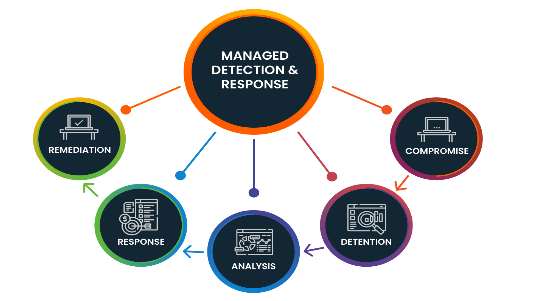

When choosing an MSS service provider, it is important to consider the issues the organization is trying to solve and the maturity of the company's existing security programs:
- If your organization has a mature internal Security Operation Center (SOC), but needs additional assistance to handle an evolving threat landscape, MSSPs may be the solution.
- If your organization doesn't have the resources, doesn't want to maintain a full internal Security Operation Center (SOC), or wants to cut costs, an MDR service is a better option.
- Managed security services provide multiple levels of response an important consideration is what level is more appropriate for your organization. Providing a full end-
to- end response can provide value, but also requires the service provider to have deeper access to organizational systems, including potentially sensitive data.
Most security service providers provide one of these response levels:
- Lighter response warnings or alerts only. This is useful because it is fast to implement and has limited privacy impact. However, it has limited scope and requires internal security staff to respond.
- Deeper response can include activities like threat hunting, identifying indicators of compromise (IoC) or triaging and validating alerts. This is useful because service provider teams can be faster and have more capabilities than in-
house teams. At the same time, it can expose some sensitive data. - End-
to- end response full recovery from persistent threats and confirmed high severity incidents. This provides a comprehensive response and can significantly reduce load on internal security staff. However, it requires broad access rights, creates a bigger potential for privacy issues and sensitive data exposure.

Key advantages of Cyber Security for Business
- Protects personal data
- Helps preserves reputation
- Enhances productivity
- Assists the remote workspace
- Regulation compliance
- Improves cyber posture
- Better data management
- Helps educate and train the workforce
- Helps maintain trust and credibility
- Streamline access control
- Supports the IT team
| IT Services Repairs |
| IT Services Maintenance |
| Cloud Computing Security |
| AI and RPA |
| Cyber Security & Data Protect |