


HIGH
QUALITY
GUARANTEE


SPECIAL
PROMO

FOR YOUR FIRST SERVICE ORDER


Their affordable nature and ease of transport have made them favorites among travelers, business people and students. With all that moving around, things can break. Because they are all one unit, many people think that you need to replace the whole computer if something breaks. This is not the case! Darwin IT can repair most of the common issues unique to laptops, including the following:
- laptop screen repair,
- laptop dc power jack repairs,
- keyboard replacement,
- laptop cooling repair,
- hard drive replacement,
- system optimization and much more.
Laptop running hot, shutting down randomly?
The heat cause laptop hard drive failure and must of laptops are build with only one cooling exhaust fan. This also cause computer to run a bit slow, combine that with viruses on system.
Tree reasons that cause the heat problem in laptops:
- Dust and debris build-
up blocking the internal heat exhaust - Poor quality and poor application of thermal compound by the manufacture.
- Programs that run the CPU at 100% full load will produce heat, Viruses, Spyware, Malware, and Adware for example.
Don't panic we can solve this issue
Laptop Cooling Repair Modification Includes:
Complete internal cleaning including the fan and heat sink exhaust, cooling modification and fresh application of Arctic Cooling MX2 thermal compound.
Laptop cooling repair service usually drops temperatures 10-
Contact us for your Computer Performance Optimization
who include
- Hard drive diagnostics test performed
- Disk cleanup useless or duplicated files are cleaned out
- Virus, Spyware, Malware, Adware completely removed
- Hard drive free space checked, 25% or less is not good
- Memory usage checked
- Computers registry, cleaned, and optimized for maximum computer performance
- System Services checked and tweaked for maximum computer performance
- Computer CPU temperature checked
- Clean out of Internal case (desktops) cleaned, mainboard system, power supply, vents and cooling fans
- Operating System checked for updates and installed
- Check Disk performed, disk errors checked and repaired
- Hardware drivers checked for updates & installed
- Web page stored history settings adjusted
- Hard drive optimized, defragmented for maximum performance
Broken internal dc power jack connector on laptop?

Dc power is a very important component of laptop but very fragile one. Overtime this internal dc power jack on the laptop can lose connection or break power connection completely with the mainboard.
Once this happens, your laptop will not accept power via its power cord, thus the battery will not charge, which means a dead laptop.
We can repair or replacement the power jack as needed at a reasonable cost to you!
This DC Jack repair service also includes an internal component cleaning, mainly the fan and heat sink, fresh thermal compound application while we have the laptop dis-
Broken, cracked laptop screen?
Laptops computers are mobile, they will drop due to the thin and light-
This is not a comprehensive guide for all computers, but it should cover the basics for most models.
You will need a few tools in order to properly install your new screen. These tools can make the process much simpler and allow you to fix things efficiently.
Prepare yourself by having the following on hand:
A clean, flat surface where you can work
A putty knife or similar object to remove the screen bezel
A magnetic Phillips screwdriver
A pin or needle for removing the bezel
A small dish to hold screws
Adhesive or tape to secure the new LCD to the laptop frame
Screen repair kits are also available for certain models, so it can be worth it to research your type of computer and see if they’re available. These kits provide you with everything you need ahead of time so you can get to work and not worry about missing an essential tool. Of course, items around your home can work just as well while saving you a bit of money.

Free pick and drop included.
We repair and replacement laptop screen for a lower price in the Northgate and surrounding area.
And we can tell you if the cost of repairing the laptop is more than the price of a new computer.
You can bring in your laptop or desktop system and Darwin IT & Associates certified technicians can test and check your systems for problems and determine a course of action to restore or repair your system.
We offer the best turnaround times. We also work extremely hard to get your computer diagnosed and repaired the first time. A technician will contact you with an estimate first, with all the hardware or software options to get your computer up and going, or give other possible solutions.
Is your computer is presenting one of the behaviors below?
- Does it randomly start slowing down?
- Are you getting strange error messages that you don’t understand?
- Does the mouse or keyboard stopped working?
- Is Windows crashing and freezing?
- Are you stuck on the Windows startup screen?
- Are you getting random software lockups?
- Are you getting a blue screen full of error messages auto-
boots? - Do you get any beeps when you turn on your computer and then nothing happen?
- Is your printer or scanner not working correctly?
- Has your monitor gone dark, showing no picture?
- Are you not hearing anything when you try and play music or video files?
- Is your computer making strange, unpleasant new sounds?
Computers are similar to vehicle; it needs regular maintenance in order to stay up to performance and speed. Even a brand new computer several months later will slow down in performance and speed if the user does not perform regular maintenance on the computer.
Your computers performance can slow down from a variety of reasons: computer hardware, and accumulated junk left behind from downloads, program uninstall's, viruses, spyware, etc. It usually has nothing to do with outdated technology other than maybe an outdated video graphics card to run the new games.
Our computer repair includes:
- PC Virus Removal
- PC Optimization
- Data Backup
- Computer Resources

There are different levels of computer failure. Below are a few of the most common malfunctions and how you can tell if they have occurred.

Power Failure
Power Failure is a fairly common problem. If your computer doesn’t power on at all, it is a complete power failure. Those of you that have a laptop, make sure it’s connected to the power supply. Test the wall socket to make sure that the outlet itself has power.
If the socket has power, the failure has to be with the power supply. You’ll have to buy a new power supply for your desktop or laptop. If you have a laptop that won’t power on without the cord, it needs a new battery.
If the power failure isn’t computer wide, it can be a little harder to track down. It could be a broken or loose wire or missing solder on a circuit board. A trained professional should look at these kinds of damages.
General signs of power failure include:
- No boot up
- No fan or hard disk sounds
- Overheating
- Lock-
up or rebooting - Smoke or electric shock

Operating System Failure
Operating systems can fail in a minor or major way due to viruses, driver compatibility and sometimes from human error. Viruses can be introduced in a number of ways: attached to downloaded programs, false email attachments and even posing as other programs.
Some viruses delete your files and others encrypt files to hold them ransom. Fight viruses by keeping your firewall up. It’s also best not to click on or download anything you aren’t sure of.
Another common OS failure cause is incorrect drivers. These problems can even keep your computer from booting up. To fix them, you must boot your system up in safe mode and uninstall the drivers that are causing the trouble.
The last significant threat to you operating system is you! Yes, I mean you computer user. There a lot of peculiar files on your computer that help it run. If you don’t recognize a file, call the manufacturer’s help line or ask a technician. Never touch anything in the “\Windows\System32” folder, or if on a Mac, the “Library” folder.
General signs of operating system failure include:
- Inability to boot
- The blue screen following attempted boot
- (Operating system not found) messages
- Lost or corrupted files
- Broken folder icon
Motherboard
The motherboard is a slightly different story than the rest. It doesn’t have moving parts, so it generally fails less. There are a couple of things that can fail on the motherboard; the most common problems are bulging capacitors or broken solder connections. This can be caused by age, smoke, dust, pressure and voltage spikes.
The majority motherboards that are discarded as bad are actually good. Make sure you troubleshoot your motherboard first. If you’re good with a soldering iron, you can try to replace capacitors or solder, but it’s best to replace the whole motherboard.
General signs of motherboard failure include:
- Beep after power up
- No BIOS access
- Peripherals not working
- Audio or screen not working
Hard disk failure is probably the most common hardware failure that computer owners have to deal with. Sooner or later, all the moving parts get old and eventually stop working.
Rarely do people realize that a hard drive is just a few delicate metal platters that rotate at extreme speed while arms move back and forth on them, reading and writing data. One bump and they could get scratched, destroying all the data in that area.
The best way to prevent hard disk failure is to keep it cool and not allow it to be moved while it is doing a lot of data transfer. Dust is another harmful thing to a hard drive. Dust can corrupt the data or clog up the fans that cool the disk, leading to overheating.
If your hard disk does fail, you can be better prepared by making regular backups of it, that way your data isn’t gone forever. The best Windows program for back up is “Acronis True Image.” If you are a Mac user you can simply use the pre installed program “Time Machine.”
General signs of hard disk failure include:
- Slow reading and writing of files
- Frequent crashes
- Frequent error messages
- Loud scratches and clicking noises
- Excess heat
- Inability to access files
- That terrible blue screen
If your computer seems to be failing, document what it is and isn’t doing. You may be able to determine what the problem is yourself, or you may need to consult a professional. Hopefully, this guide can help you in that decision.

Hard Drive

Disk Cleaning
Over time, mostly in one week increments, the hard drive will accumulate "trash." This includes temporary files, recycle bin files and cookies that clutter up your hard drive and slow down your computer. If you use Internet Explorer, for example, and don't clean out the temporary files, it may seem like the browser is moving at a crawl. Running DiskClean in Window's System Tools will help.

Updating
Keeping computer software up-
Troubleshooting, Data Recovery, Drive Cleaning, Driver Installation and Updates, Software Install, Internet Installation, Networking and Security Awareness


Physical Maintenance
In addition to software maintenance, you should also do regular physical cleaning. If you have a desktop computer, open up the case and blow out the dust inside. For laptops, use canned air to blow in and around the keys to get rid of the dirt, dust and other debris that has accumulated there. Dust and debris can create heat, which can affect your computer's motherboard performance. The more that collects, the more of a chance your computer can overheat, requiring a shutdown.

Want to buy new IT equipment?
Before heading out to a big box store, have a chat with us first.
Darwin IT offers personalized service that goes beyond what major electronics outlets can offer. What’s more, we believe in letting you decide what you want in your computer, as opposed to forcing you to buy a computer loaded with software you will never use.
Do not panic!
- Don’t try to re-
install your operating system or format your hard drive right away; - STOP using the PC;
- The longer you have it running, the more chance of the malware causing more.
- If you aren’t comfortable trying to troubleshoot your own PC, then your best is to turn it off as quickly.
We are geniuses at getting those malicious attackers off your computer and for good. Bring your computer to Darwin IT & Associates today to get your computer clean and free of infections. We also offer software solutions which help prevent attacks in the future. Although it's extremely difficult to keep infections from happening 100% of the time, we have the software and advice to set you on the right path.
Also, go to our Data Protection page to learn more about protecting your computer.
Are you experiencing any of the following issues with your computer?
- Computer is running very slow and not loading up very fast
- Strange software is asking you for your credit card information
- Programs you didn’t install are starting to appear
- Windows popping up from nowhere
- Your web browser keeps taking you to a website you didn’t intend to visit or your homepage has changed
- You can’t run some of your programs (usually anti-
virus or system tools) due to a strange error - You have been a victim of identity theft recently
There is a very good chance you have been infected with a virus, worm, rootkit or another form of malware.

We have a team of passionate, certified, knowledgeable, and highly experienced technicians that provide standard MacBook repair services for software and hardware issues. We resolve issues including Mac’s MLB Repair, Mac’s GPU Repair, Mac’s SSD Upgrade, Mac’s RAM Upgrade, Keyboard/Top Case Repair/Replacement, Mac Port Repair, Mic and Speaker Repair, Data Migration/Backup, Password Reset, iOS Restore, Liquid Damage, Overheating, Charging Issues, Battery Replacement, and Display Replacement.
We offer doorstep repairs and pickup & delivery, on top of its walk-in service. MacBook repair estimates are readily available for obvious issues such as a damaged screen or battery replacement. If the problem with your MacBook is connected to the logic board, a repair estimate is only available after diagnosis, which can take anywhere from a few hours to 3 days max.


If you are experiencing problems with your Apple MacBook keyboard, such as keys not working or sticking, it may need to be replaced. Replacing your MacBook keyboard from an Apple authorized service provider will be expensive. However, you can save some money by taking your laptop to an independent service provider.
The cost of replacing your MacBook keyboard will depends on the model and year of your MacBook, as well as the type of keyboard required.
MacBook Keyboard replacement service details.
- Warranty: We provide a warranty of 1 year on all MacBook keyboard replacements
- Turnaround time: Since there are a lot of MacBook models, we might need to procure the keyboard on demand basis depending on the model. Typically, we take 1 to 2 days to get this replaced if stock is not available in our service centers.
- Pickup & Drop:We offer Free Pickup and Drop for MacBook repairs. Please note that this repair is complex and cannot be performed at your doorstep.

Upgrading your MacBook SSD is definite way of boosting Speed at the same time increasing the drive storage capacity. We tested read and write speeds before and after SSD upgrade for a MacBook Pro.

Broke your MacBook pro or MacBook air screen? MacBook screen issues due to accidental and liquid damage are common. This document provides all the details regarding cost, quality and service details depending on your MacBook model.
MacBook screen replacement cost depends on the model and the quality of the MacBook Screen
MacBook screen replacement service details
- Turnaround time: It takes 1-
2 days to replace a MacBook display and depending on the MacBook model and availability of stock. - Warranty: we provide a warranty of 1 Year on all MacBook screens.
- Cost: MacBook screen cost depends on the MacBook model and the screen quality. We provide three different qualities of screen: Original new, Compatible and Original used. Please enquire more details with our team.
- Doorstep service: we provide free pickup and drop service for MacBook display replacement.

MacBook users often face the problem of a drained battery. While replacing the battery on your own is an option, we offers MacBook battery replacement as a service to make this an effortless procedure for our customers.
We believe that if you are well aware that your battery life is getting compromised and needs to be replaced, these red flags can be a sign for you to go for a MacBook battery replacement service to promptly and safely replace your battery for a new one.

- If a straightforth pop-
up warning appears on the Mac screen stating that you need to replace the battery, get it done sooner than later. - The MacBook offers exceptional battery performance. But a damaged battery can offer 25% less run-
time than what is expected from them. If you have a good eye at catching this, know it's an indication that your battery is in need of a change. - If you are troubled with unexpected laptop shutdowns without any warning, you can take it as a warning that you have a faulty battery.
- If your MacBook experiences overheating along with any of the above issues, you are likely experiencing a battery issue.


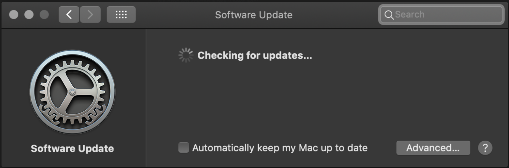
In order to keep your Mac best equipped to handle vulnerabilities and avoid bugs, updating your software frequently is a must.

Shut down your Mac, then turn it on and immediately press and hold these four keys together: Option, Command, P, and R. You can release the keys after about 20 seconds, during which your Mac might appear to restart.


Resetting the system management controller (SMC) can resolve certain issues related to power, battery, fans, and other features.


To get started, restart your Mac and hold down the Command and R keys until a menu appears. Next, choose Reinstall MacOS, and the tool will walk you through the next steps.


Making it a habit to backup your data every week or two can save you the heartbreak of having something go wrong and losing a slew of files that you can’t salvage from anywhere else.

Apple Mac
Repair & Service Specialist
We are committed to deliver the best Mac repair services.
No matter what you use your Mac for, we offer fast and cost effective solutions for your Mac apple products.
- Motherboard Repair
- Speaker Replacement
- Airport Card Replacement
- Optical Drive Replacement
- Memory Upgrade
- Inverter Replacement
- Storage Upgrade
- Water Damage Repair
- Led & LCD Screen Replacement
- Keyboard Replacement
- Reformatting and Reinstalling
- OS Upgrade
CALL NOW +27 83 319 7201
Buy -
Professional Services for Home and Office
info@darwinita.co.za


- Computer Network
- Data Recovery Services
- IT Business and Services
- IT Support Services
- On Site Support
- Remote Desktop Assistance
- Cloud Computing
- Information Security
All Trademarks and Registered Trademarks are the property of their respective Owners.
2005 – 2024 Darwin & Associates IT, All rights Reserved
We offer:
- The highest quality parts and components
- Systems that are customized to your exact specifications
- Systems tuned for top performance right out of the box
- Security, antivirus and Windows updates pre-
installed - No salesperson trying to sell you an useless extended warranty
Why Choose Darwin IT & Associates
- In House Service Available
- Pickup and Delivery Services
- Explanation of our Services
- Best Practice & Best Value
Computer Repair Sales Upgrades
"Low Price Guarantee" on Repairs
Highly Skilled Repair Specialists on duty
When contact us,
- We’ll review your computer requirements, assess a budget and begin to source parts immediately.
- We deal with several OEM suppliers to ensure the best possible price for you.
- We also provide certified refurnished PC and Laptop.
Contact us for more information’s and a personalized quote today!
Backup Your Confidential Data
- If your PC or computer needs a hard drive replacement, it might be possible to get some data to lose or transfer the need to the new hard drive. Hence, it is necessary to take the backup confidential data or significant contents on your computer. You can save the data into a storage drive or pen drive for future use. Hence, it will allow you to use the necessary data like photos, documents, files, and PDF files securely while servicing your computer. For this objective, you can take the help of a computer professional who can take backup of data of PC before performing any hardware replacement or repairing work.

| IT Services Repairs |
| IT Services Maintenance |
| Cloud Computing Security |
| AI and RPA |
| Cyber Security & Data Protect |