


All Trademarks and Registered Trademarks are the property of their respective Owners.
2005 – 2024 Darwin & Associates IT, All rights Reserved
Cloud computing refers to the use of hosted services, such as data storage, servers, databases, networking, and software over the Internet. The data is stored on physical servers, which are maintained by a cloud service provider. Computer system resources, especially data storage and computing power, are available on-demand, without direct management by the user in cloud computing.
Instead of storing files on a storage device or hard drive, a user can save them on cloud, making it possible to access the files from anywhere, as long as they have access to the web. The services hosted on cloud can be broadly divided into infrastructure-as-a-service (IaaS), platform-as-a-service (PaaS), and software-as-a-service (SaaS). Based on the deployment model, cloud can also be classified as public, private, and hybrid cloud.
Further, cloud can be divided into two different layers, namely, front-end and back-end. The layer with which users interact is called the front-end layer. This layer enables a user to access the data that has been stored in cloud through cloud computing software.
The layer made up of software and hardware, i.e., the computers, servers, central servers, and databases, is the back-end layer. This layer is the primary component of cloud and is entirely responsible for storing information securely. To ensure seamless connectivity between devices linked via cloud computing, the central servers use a software called middleware that acts as a bridge between the database and applications.

Virtualization is the creation of virtual servers, infrastructures, devices and computing resources.
Virtualization changes the hardware-
Virtualization techniques allow companies to turn virtual their networks, storage, servers, data, desktops and applications.
The Basics of Virtualization
A great example of how virtualization works in your daily life is the separation of your hard drive into different parts. While you may have only one hard drive, your system sees it as two, three or more different and separate segments. Similarly, this technology has been used for a long time. It started as the ability to run multiple operating systems on one hardware set and now it is a vital part of testing and cloud-
A technology called the Virtual Machine Monitor also called virtual manager encapsulates the very basics of virtualization in cloud computing. It is used to separate the physical hardware from its emulated parts. This often includes the CPU’s memory, I/O and network traffic. A secondary operating system that is usually interacting with the hardware is now a software emulation of that hardware, and often the guest operating system has no idea it’s on the virtualized hardware.
Despite the fact that the performance of the virtual system is not equal to the functioning of the “true hardware” operating system, the technology still works because most secondary OS's and applications don’t need the full use of the underlying hardware. This allows for greater flexibility, control and isolation by removing the dependency on a given hardware platform.
The layer of software that enables this abstraction is called “hypervisor”. A study in the International Journal of Scientific & Technology Research defines it as “a software layer that can monitor and virtualize the resources of a host machine conferring to the user requirements.”
The most common hypervisor is referred to as:
Type 1 hypervisor, by talking to the hardware directly, it virtualizes the hardware platform that makes it available to be used by virtual machines.
Type 2 hypervisor, which requires an operating system. Most often, you can find it being used in software testing and laboratory research.
Cloud computing services offer you a number of benefits from reducing the total cost of technology ownership to improving your organization’s ability to respond faster to market opportunities. Understanding these benefits will help you plan your implementation better.
Cloud computing is quickly becoming an integral option in our technical lives. If you need help walking through the options of getting your information saved, shared, or collaborated on using the cloud, Darwin IT & Associates is here to help.


Cloud computing can either be classified based on the deployment model or the type of service. Based on the specific deployment model, we can classify cloud as public, private, and hybrid cloud. At the same time, it can be classified as infrastructure-

In a private cloud, the computing services are offered over a private IT network for the dedicated use of a single organization. Also termed internal, enterprise, or corporate cloud, a private cloud is usually managed via internal resources and is not accessible to anyone outside the organization. Private cloud computing provides all the benefits of a public cloud, such as self-
Private clouds provide a higher level of security through company firewalls and internal hosting to ensure that an organization’s sensitive data is not accessible to third-


Public cloud refers to computing services offered by third-
Public clouds can help businesses save on purchasing, managing, and maintaining on-


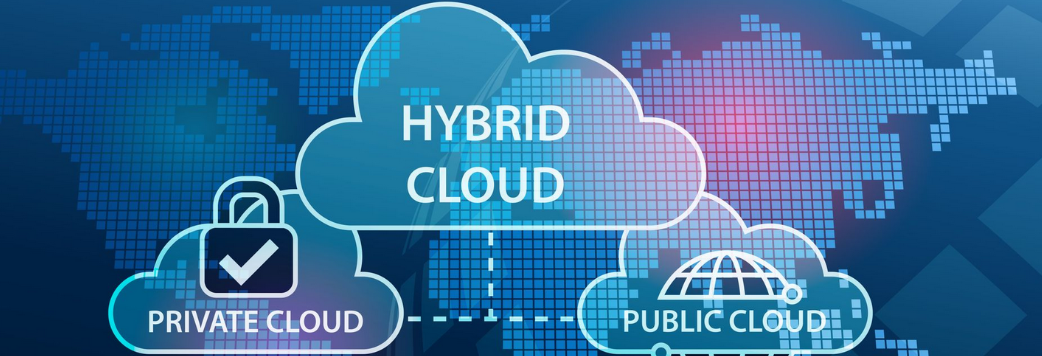
Hybrid cloud uses a combination of public and private cloud features. The “best of both worlds” cloud model allows a shift of workloads between private and public clouds as the computing and cost requirements change. When the demand for computing and processing fluctuates, hybrid cloud opens a new window allows businesses to scale their on-
In a hybrid cloud model, companies only pay for the resources they use temporarily instead of purchasing and maintaining resources that may not be used for an extended period. In short, a hybrid cloud offers the benefits of a public cloud without its security risks.


OpenShift is a cloud-
OpenShift supports a very large variety of applications, which can be easily developed and deployed on OpenShift cloud platform. OpenShift basically supports three kinds of platforms for the developers and users.
Infrastructure as a Service (IaaS)
In this format, the service provider provides hardware level virtual machines with some pre-
The main drawback of having IaaS after a long procedure of setup and investment is that, one is still responsible for installing and maintaining the operating system and server packages, managing the network of infrastructure, and taking care of the basic system administration.
Software as a Service (SaaS)
With SaaS, one has the least worry about the underlying infrastructure. It is as simple as plug and play, wherein the user just has to sign up for the services and start using it. The main drawback with this setup is, one can only perform minimal amount of customization, which is allowed by the service provider. One of the most common example of SaaS is Gmail, where the user just needs to login and start using it. The user can also make some minor modifications to his account. However, it is not very useful from the developer’s point of view.
Platform as a Service (PaaS)
It can be considered as a middle layer between SaaS and IaaS. The primary target of PaaS evaluation is for developers in which the development environment can be spin up with a few commands. These environments are designed in such a way that they can satisfy all the development needs, right from having a web application server with a database. To do this, you just require a single command and the service provider does the stuff for you.






- Computer Network
- Data Recovery Services
- IT Business and Services
- IT Support Services
- On Site Support
- Remote Desktop Assistance
- Cloud Computing
- Information Security
Infrastructure-
- Physical machines,
- Virtual machines,
- Virtual storage, etc.
Platform-
- Applications,
- Development,
- Deployment tools, etc.
Software-
- Software applications as a service to end-
users. - Customer relationship management (CRM)
- Enterprise resource planning (ERP)
- Accounting software
- Human capital management (HCM) and human resources
- Project management
- Collaboration software
Cloud Computing Value Proposition
- IT management simplification
- Operation and maintenance cost reduction
- Business mode innovation
- Low cost outsourcing hosting
- High service quality outsourcing hosting

Data Virtualization
This kind of cloud computing virtualization technique is abstracting the technical details usually used in data management, such as location, performance or format, in favor of broader access and more resiliency that are directly related to business needs.

Desktop Virtualization
As compared to other types of virtualization in cloud computing, this model enables you to emulate a workstation load, rather than a server. This allows the user to access the desktop remotely. Since the workstation is essentially running in a data center server, access to it can be both more secure and portable.
Network virtualization in cloud computing is a method of combining the available resources in a network by splitting up the available bandwidth into different channels, each being separate and distinguished. They can be either assigned to a particular server or device or stay unassigned completely all in real time. The idea is that the technology disguises the true complexity of the network by separating it into parts that are easy to manage, much like your segmented hard drive makes it easier for you to manage files.
Network Virtualization
This technique is the masking of server resources. It simulates physical servers by changing their identity, numbers, processors and operating systems. This spares the user from continuously managing complex server resources. It also makes a lot of resources available for sharing and utilizing, while maintaining the capacity to expand them when needed.

Server Virtualization

Storage Virtualization
Using this technique gives the user an ability to pool the hardware storage space from several interconnected storage devices into a simulated single storage device that is managed from one single command console. This storage technique is often used in storage area networks. Storage manipulation in the cloud is mostly used for backup, archiving, and recovering of data by hiding the real and physical complex storage architecture. Administrators can implement it with software applications or by employing hardware and software hybrid appliances.
Virtualization has many practical applications. Other than being able to run a different operating system on your device and it is called hardware virtualization, it also allows users to allocate hardware resources to other functions that maximize your hardware’s performance.
Here are some methodologies to look at when talking about virtualization techniques in cloud computing:

Application Virtualization
Software virtualization in cloud computing abstracts the application layer, separating it from the operating system. This way the application can run in an encapsulated form without being dependant upon the operating system underneath. In addition to providing a level of isolation, an application created for one OS can run on a completely different operating system.





Infrastructure as a Service (IaaS) Providers
- Amazon EC2
- Google Compute Engine
- DigitalOcean
- Azure Virtual Machines
- SAP Business Technology Platform
- Linode
- AWS HPC
- Utho
- Fujitsu IaaS
- VMware Cloud Director
Platform as a Service (PaaS) Providers
- AWS Elastic Beanstalk
- Oracle Cloud Platform (OCP)
- Google App Engine
- Microsoft Azure
- Salesforce aPaaS
- Red Hat OpenShift PaaS
- Mendix aPaaS
- IBM Cloud Platform
- SAP Cloud Platform
- Engine Yard
Software-
- Google Workspace
- Microsoft
- Cisco WebEx
- Adobe Creative Cloud
- Amazon Web Services
- Salesforce
- ServiceNow
- Workday
- Concur
- Dropbox

Based on the service model, cloud can be categorized into IaaS (Infrastructure-


Infrastructure as a service or IaaS is a type of cloud computing in which a service provider is responsible for providing servers, storage, and networking over a virtual interface. In this service, the user doesn’t need to manage the cloud infrastructure but has control over the storage, operating systems, and deployed applications.
Instead of the user, a third-

Platform as a service or PaaS is a type of cloud computing that provides a development and deployment environment in cloud that allows users to develop and run applications without the complexity of building or maintaining the infrastructure. It provides users with resources to develop cloud-
PaaS doesn’t require users to manage the underlying infrastructure, i.e., the network, servers, operating systems, or storage, but gives them control over the deployed applications. This allows organizations to focus on the deployment and management of their applications by freeing them of the responsibility of software maintenance, planning, and resource procurement.

SaaS or software as a service allows users to access a vendor’s software on cloud on a subscription basis. In this type of cloud computing, users don’t need to install or download applications on their local devices. Instead, the applications are located on a remote cloud network that can be directly accessed through the web or an API.
In the SaaS model, the service provider manages all the hardware, middleware, application software, and security. Also referred to as ‘hosted software’ or ‘on-

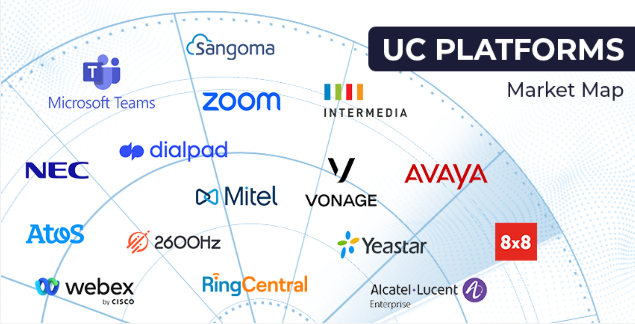
Unified Communications as a Service is a cloud communication platform for business that combines telephony, conferencing, unified messaging, instant messaging, mobility, and collaboration. UCaaS allows teams to communicate more efficiently by combining tools into a single, easy-
Unified communications solutions are powered by cloud infrastructure operated by the UCaaS provider. This eliminates the need for customers to maintain expensive telephony infrastructure like a PBX. UCaaS solutions are usually provided as a monthly recurring service.
Set up and deployment are simple, as the infrastructure resides in the cloud. UCaaS is so simple to deploy that many end users can set up UCaaS systems themselves. Customers that need help can purchase deployment services from their UCaaS provider for a fraction of the cost of a legacy PBX deployment.
UCaaS replaces the traditional on-

A UCaaS system helps businesses improve efficiency and productivity, and helps employees stay connected from anywhere. Essential functions of UCaaS include:
- Chat: Instant messaging helps dispersed teams connect in real time. Chat often includes features like individual and group messaging, team and project channels, and embedded file sharing capabilities for quick and convenient communication.
- Voice: Phone services like call forwarding, conference calling, call recordings, and advanced call routing help businesses make decisions faster. In UCaaS, voice capabilities work using VoIP technology.
- Video: Video enables online meetings for teams, allowing for face-
to- face interactions even across time zones. Advanced collaboration features like screensharing, recordings, and chat help teams make the most out of this essential tool. - Collaboration: Collaboration features such as calendars and scheduling, file sharing, and project management tools make it easy for employees to work cross-
functionally and align on goals.
Effective communication is essential to businesses of any size, especially as more companies adapt a permanent hybrid and remote working model. But UCaaS helps teams with more than just virtual collaboration—it also helps business stay competitive in changing markets.
Some advantages of UCaaS include:
- Reduced costs: Since UCaaS is cloud based and works in one interface, companies spend less on maintenance, licensing fees, and initial installation. Businesses may also save on office and travel expenses.
- Scalability: UCaaS solutions simplify onboarding and make it easy to add new users as teams grow. UCaaS systems will also have the newest technology to improve businesses processes, automatically updating with new security features, tools, and apps.
- Improved productivity: Instead of working across several platforms, employees have everything they need in a centralized location—which improves workflow efficiency and project management. This helps teams move faster and improve work quality.
- Flexibility: With a variety of communication tools in one platform, UCaaS helps businesses respond and adjust to changes quickly, plus respond to customer needs faster. UCaaS also empowers employees to work from almost anywhere on any device with a reliable Internet connection.

UCaaS comes with many business benefits, but there are some disadvantages to consider, too.
- Advantages of UCaaS include:
Faster deployment.
Greater mobility for employees.
Cost savings.
Better workflow efficiency.
Always up-
- Disadvantages of a UCaaS include:
Dependency on a strong internet connection.
Limited emergency calling.
Possible interoperability problems with existing hardware.

The most important reason why cloud computing is growing rapidly is the various benefits it offers. It saves businesses the time and resources required to set up full-


Maintaining IT systems requires big outlays of capital, something that cloud helps reduce. By using the resources provided by the cloud provider, businesses avoid the need to purchase expensive infrastructure, substantially reducing their expenditure. Cloud providers work on the pay-

Cloud allows organizations to grow their users from merely a few to thousands in a very short time. Depending on the need, a business can scale their storage needs up or down, allowing organizations to be flexible.

On-

Since the data on cloud can be accessed directly via the Internet, it gives employees the ability to work from anywhere, anytime. Cloud gives you the freedom to set up your virtual office anywhere you are. It also allows teams to work on a project across locations by giving them access to the same files as third-

The biggest cloud computing services run on a worldwide network of secure datacenters, which are regularly upgraded to the latest generation of fast and efficient computing hardware. This offers several benefits over a single corporate datacenter, including reduced network latency for applications and greater economies of scale.

Cloud computing makes data backup, disaster recovery, and business continuity easier and less expensive because data can be mirrored at multiple redundant sites on the cloud provider’s network.

Cloud safely stores and protects your data in the event of an outage or crisis. This makes it easier to resume work once the systems are up and running again.

Many cloud providers offer a broad set of policies, technologies, and controls that strengthen your security posture overall, helping protect your data, apps, and infrastructure from potential threats.

Cloud computing issue is related to the security associated with the technology. Although cloud service providers assure you of implementing the best security standards and industry certifications, there’s always a risk while storing your data on cloud.

Almost every cloud user will tell you that outages tops their list of cloud computing challengesOpens a new window . At times, cloud service providers may get overwhelmed due to the huge number of clients they provide services to each day. This may lead to technical outages, due to which your applications may temporarily experience some downtime.

A user may not be able to access the data on cloud without a good Internet connection and a compatible device. Moreover, using public Wi-

Cloud providers use a pay-

Even if your cloud service provider promises you that they have the most reliable security certifications, there’s always a chance of losing your data. With hackers increasingly targeting cloud storage to gain access to sensitive business data, this might be an even greater concern, for which the appropriate measures need to be taken.


A user may have minimal control since the cloud service provider owns and manages the infrastructure. The user would only be able to manage applications and not the backend infrastructure. Crucial tasks, such as firmware management, may not be passed to the user at all. You always have to trust a third-
Every organization can benefit by moving to a UCaaS system, but the fear of communication disruptions may be holding businesses back from making the switch. To make the transition smoother and ensure business continuity, consider the following best practices:
- Audit your current communication tool stack.
When transitioning from a legacy communications system to a UCaaS platform, it’s important to identify all current communication tools employees use across teams and departments. You may find tools overlap or there are certain features you don’t use at all, which will help you make informed decisions as you move to a new UCaaS system.
- Assess your needs.
UCaaS systems typically operate on a tiered services plan, so knowing what features you need and where your current gaps are is critical. This assessment period is also a chance to gather feedback from team members and learn where workflows could be improved.
- Alert your team and give a transition timeline.
As you move to a UCaaS system, ensure your team understands the timeline of the switch. Will it be a phased rollout or an immediate transition? Keeping employees in the loop helps ensure they have enough time to document processes and keeps business disruption to a minimum.
- Access learning resources early on.
While you can expect a learning curve as you switch communications systems, providing support and resources early on should help make the process smoother. Take advantage of learning materials provided by the UCaaS provider or conduct a training to ensure employees have everything they need once the new UCaaS system is implemented.


| IT Services Repairs |
| IT Services Maintenance |
| Cloud Computing Security |
| AI and RPA |
| Cyber Security & Data Protect |